
Freelancing has never been more popular, and it is easy to see why. People want control over where they work, when they work, and who they work with.
But that freedom comes with a catch. Your important files, software, and projects often live on one main computer at home.
So what happens when you are at a cafe, a co-working space, or visiting family in another city? You still need to reach that machine.
This guide explains, in plain language, how remote desktop tools let freelancers work from almost anywhere without leaving their setup behind.
Why It Matters for Freelancers
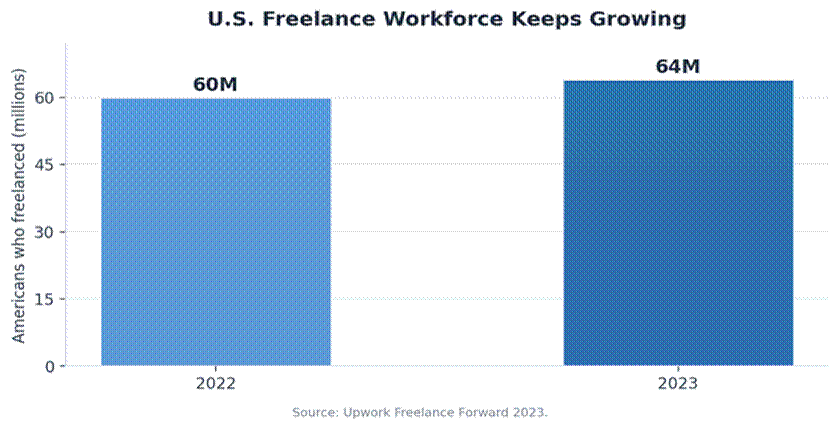
The freelance economy is huge and still growing. According to Upwork, around 64 million Americans did freelance work in 2023, up from 60 million the year before.
That is about 38 percent of the US workforce, and these professionals added roughly 1.27 trillion dollars to the economy in a single year.
Crucially for this topic, nearly half of those freelancers, around 30 million people, provide skilled knowledge services such as programming, design, marketing, and consulting. That is work done almost entirely on a computer.
Most of this work is digital. Writers, designers, developers, and consultants all rely on a computer as their workshop, and many turn a skill into a side income from wherever they are.
That is where remote desktop access for freelancers comes in, letting you reach your main work computer from a laptop, tablet, or phone wherever you happen to be.
What Remote Desktop Access Actually Is
In simple terms, it is software that lets you see and control one computer from another device over the internet.
Your powerful desktop stays at home doing the heavy lifting. You simply view its screen and control it, as if you were sitting in front of it.
That means your files, your software, and your settings are all there, exactly as you left them, no matter which device you are holding.
For a freelancer, this turns a single home computer into a workshop you can carry in your pocket.
The Big Wins for Freelancers
The benefits go well beyond convenience. The table below sums up where remote access pays off most for independent workers.
|
Benefit |
What it means for you |
|
Work from anywhere |
Any room with internet becomes a usable office |
|
Travel light |
Heavy files and software stay on the home machine |
|
Full toolkit access |
Use licensed, powerful apps from a basic laptop |
|
Faster client service |
Fix files or send work without being at your desk |
|
Lower hardware cost |
One strong computer serves all your devices |
|
Peace of mind |
Work continues through trips, moves, and outages |
Working from anywhere is the headline. A coffee shop, a library, or a beach town all become valid offices when your real machine is one tap away.
You also avoid carrying everything with you. Heavy design files and licensed software stay on the home computer, so a light laptop is enough on the road.
Client work stays smooth too. You can jump on your main system to fix a file or send a deliverable, even when you are away from your desk.
Who Benefits Most
Almost any digital freelancer gains something, but a few groups feel the difference right away.
Designers and video editors keep their heavy software and large project files on one capable machine, then work from a thin laptop anywhere.
Developers reach their full coding environment without rebuilding it on every device, which saves hours of setup.
Writers and consultants get to their research, templates, and client folders from any location, with nothing left behind.
Frequent travelers and digital nomads gain the most of all, since their office effectively follows them from city to city.
A Growing Toolkit
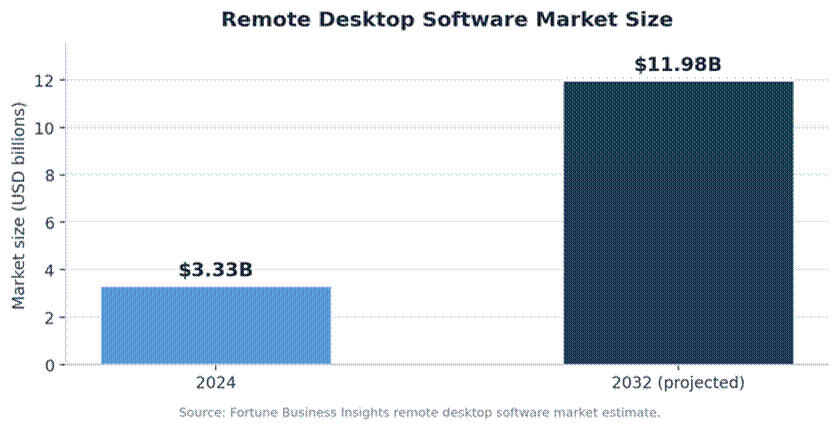
Demand for these tools is climbing fast. One set of industry projections values the remote desktop software market at 3.33 billion dollars in 2024, rising to nearly 12 billion by 2032.
That growth reflects how normal flexible work has become. The same shift is why so many freelancers now work while they travel, blending income and exploration.
For independent workers, the takeaway is simple. The tools are mature, affordable, and built for exactly this kind of mobile, on-demand work.
How It Compares to Other Options
Remote desktop access is not the only way to work on the move, but it solves a specific problem better than the alternatives.
Cloud storage keeps your files reachable, yet it does not give you your installed software or your exact setup. You still need the right apps on hand.
Carrying a powerful laptop everywhere works, but it is heavier, costlier, and riskier if it is lost or stolen on a trip.
Remote desktop access blends the best of both. Your files and your full software live safely at home, while you reach them from any light device. You get the power of a desktop with the freedom of a phone.
Staying Secure on the Road
Freedom should not mean taking risks with client data. Public networks, in particular, can expose what you send and receive.
This is why using public Wi-Fi safely matters so much. A few simple habits keep your sessions private even on a shared connection.
Always turn on multi-factor authentication, which adds a second check beyond your password. Use a tool with strong encryption, and lock your screen when you step away.
It also pays to keep client files secure in the cloud rather than scattered across devices, so a lost laptop never means lost work.
How to Get Started
You do not need to be technical to set this up. A simple, careful start beats a rushed one.
A few steps will get most freelancers up and running quickly.
• Pick a reputable remote desktop tool with encryption and multi-factor login.
• Install it on both your home computer and your travel device.
• Test the connection from another network before you rely on it.
• Set a strong password and keep both devices updated.
Once it works smoothly at home, you can trust it on the road. Start with small tasks, then move to full projects as your confidence grows.
Common Mistakes to Avoid
A few simple errors trip up new users. Knowing them in advance saves frustration later.
• Using weak or reused passwords on the host computer.
• Skipping multi-factor authentication to save a few seconds.
• Leaving the home machine asleep so it cannot be reached.
• Working over public Wi-Fi without any added protection.
That last point matters most. A quick safeguard on an open network is the difference between a private session and an exposed one.
Keeping Your Connection Fast and Reliable
A remote session is only as good as the link behind it. A little planning keeps things smooth when you are away from home.
Where you can, choose a stable network over the fastest one. A steady cafe connection often beats a crowded public hotspot that keeps dropping.
Lowering the screen quality in your tool can also help on slow networks, trading a little sharpness for a much smoother experience.
And keep your home computer awake and online. A quick change to its power settings prevents the frustration of connecting to a sleeping machine.
Frequently Asked Questions
Is remote desktop access hard to set up?
No. Most tools install in minutes and connect with a simple login, so even non-technical freelancers can get going quickly.
Will it work on a slow connection?
It works best on a steady connection, but many tools adjust quality automatically, so even modest internet speeds handle everyday tasks.
Is it safe for sensitive client work?
Yes, when configured well. Encryption, multi-factor authentication, and a secure connection protect your sessions and your clients’ data.
Can I use it from my phone or tablet?
Yes. Most tools offer mobile apps, letting you check in on your main computer from almost any device.
Does it cost a lot?
Plans are generally affordable, and many freelancers find the time saved and the flexibility gained more than cover the modest monthly cost.
The Bottom Line
For freelancers, remote desktop access turns a single computer into a flexible, go-anywhere workspace. It removes the need to choose between freedom and productivity.
Set it up carefully, keep security front of mind, and your home machine is always within reach. Wherever the work takes you, your full setup comes along for the ride.
For a modern freelancer, that kind of freedom is no longer a luxury. It is simply part of running a flexible, independent business.